Brand2Social is a social media management platform designed for digital marketers, social media managers, and agencies. It lets you create, schedule, and publish content across Facebook, Instagram, Twitter, YouTube, LinkedIn, and Google My Business — all from one place. With built-in team collaboration, approval workflows, performance tracking, and multi-brand management, Brand2Social helps you maintain a consistent, engaging social media presence without the overhead of managing each platform separately.
Explore our plans and pricing here.
Scheduling
Brand2Social’s scheduling feature lets you plan and automate your social media posts across all supported platforms, ensuring a consistent flow of content without the need for constant manual updates.
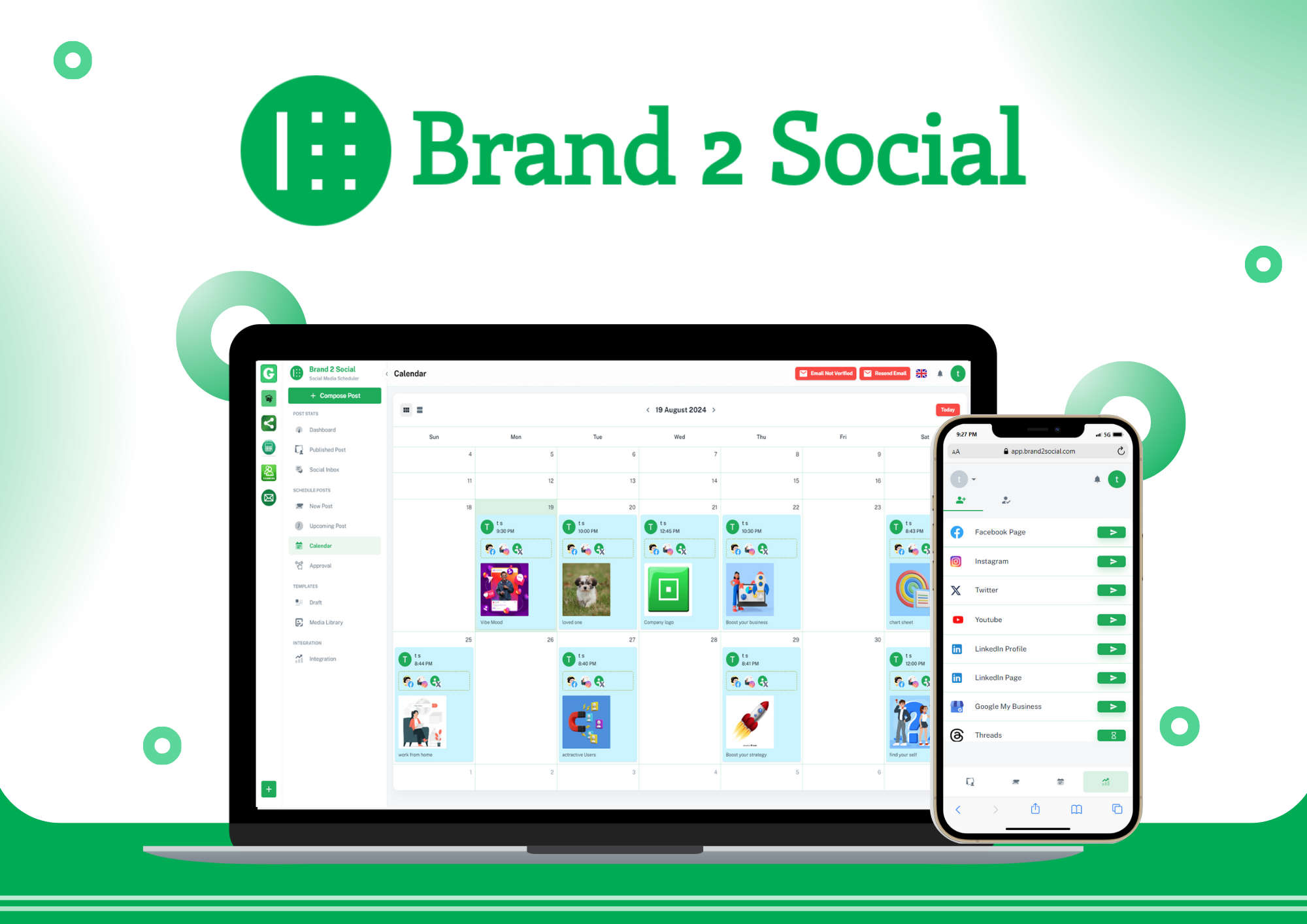
- Calendar view — visualize your entire posting schedule across all accounts and platforms in one unified calendar, making it easy to spot gaps and plan ahead.
- Multi-platform posting — schedule a single post to go live on multiple platforms simultaneously, or tailor the timing for each platform individually.
- Optimal timing — schedule posts to go live when your audience is most active, maximizing reach and engagement without needing to be online at that moment.
For step-by-step instructions, see the Getting Started guide in the help center.
Social Inbox
The Social Inbox is your centralized hub for managing all social media interactions across every connected account. Instead of logging in to each platform separately to check for messages and comments, everything comes into one interface.
- Unified messaging — consolidates messages, comments, and mentions from all connected social media platforms into a single feed.
- Prompt responses — respond to your audience directly from Brand2Social without switching between platforms.
- No missed interactions — ensures every comment, mention, and direct message is visible and actionable, keeping your engagement levels high.
Social Media Integrations
Brand2Social connects to all major social media platforms, allowing you to manage every account from a single dashboard.
Supported platforms include:
- Facebook Pages — Posts and Reels.
- Instagram — Posts, Reels, and Stories.
- Twitter (X) — Posts and media.
- YouTube — Video uploads and scheduling.
- LinkedIn Pages and Profiles — Company and personal posts.
- Google My Business — Business updates, offers, and events.
Account setup is straightforward, and Brand2Social provides token status monitoring so you are always notified if a connection expires and needs to be refreshed. For integration guides, see the Social Integrations section of the help center.
Drafts
The Drafts feature gives you a place to save and organize unfinished posts at any stage of the content creation process — whether you are still brainstorming, waiting for assets, or pending approval on copy.
- Save at any stage — save a post as a draft at any point and return to it later without losing your work.
- Full edit access — revisit and refine drafts as many times as needed before scheduling or publishing.
- Content pipeline — keep a library of ideas and in-progress posts organized in one place, so you always have content ready to develop when needed.
Manage Brands and Users
Brand2Social provides a structured, flexible system for managing multiple brands and team members within your organization.
- Multiple brands — create separate brand workspaces for each client or business unit, each with its own connected accounts, content calendar, and team.
- Role-based permissions — assign roles such as Admin, Editor, and Approver to team members, controlling exactly who can create, edit, schedule, and publish content.
- Secure access — ensure only authorized users can access specific brands or perform sensitive actions, reducing the risk of unauthorized changes.
For a full breakdown of how Organizations, Brands, and Users work together, see the Overview of Organizations, Brands and Users guide.
Post Approval
The Post Approval feature enables a structured content review process before anything goes live, making it especially valuable for teams where brand consistency and compliance matter.
- Submission and review — team members submit posts for review, and designated approvers are notified to evaluate the content.
- Feedback and edits — approvers can suggest edits or request changes before approving a post, keeping communication contextual and clear.
- Quality control — ensures every post meets your brand’s standards and guidelines before it reaches your audience, reducing errors and maintaining content quality.
- Transparent workflow — the full approval status of each post is visible to all relevant team members, promoting accountability and better collaboration.
Customization and White Label
Brand2Social offers customization and white label options designed for agencies and resellers who want to present the platform under their own brand.
- Interface customization — tailor the platform’s look and feel to match your brand identity, creating a cohesive experience for your team and clients.
- White label — agencies and resellers can rebrand Brand2Social entirely as their own product, delivering a professional, branded solution to clients without any Brand2Social branding visible.
- Client-ready — white label setups allow agencies to offer social media management tools to clients under their own name and logo, strengthening their service offering.
Cross Post
The Cross Post feature automates the distribution of content from one social media account (Source Profile) to multiple others (Target Profiles) on a set schedule — without any manual effort after the initial setup.
- Automatic distribution — any post published on the Source Profile is automatically shared to all linked Target Profiles at your configured time.
- Flexible timing — set different distribution times for different Target Profiles to optimize posting times per platform.
- Notifications — receive in-app and email notifications confirming successful distribution, or alerting you if a post fails due to platform-specific media requirements.
For full setup instructions, see the Cross Post guide.
Each of these features is designed to help you create, schedule, publish, and analyze your social media activities more efficiently — whether you are a solo marketer or a large agency team managing dozens of clients.